
Music Player - MP3 Player5.4.1 - Google Play
You'll be able to see results in few seconds.
Publisher Description
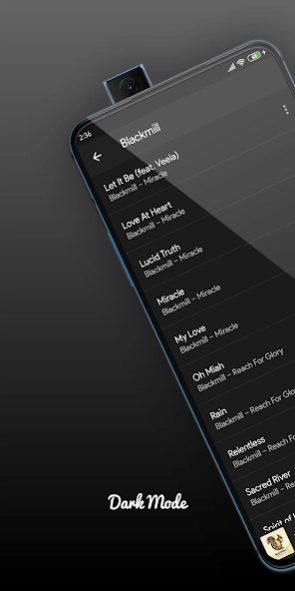

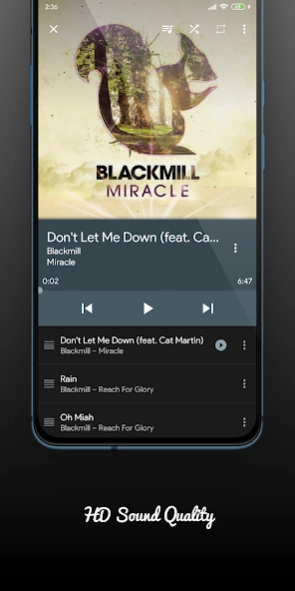

Play Music with #1 Music Player, Equalizer, Lyrics, Genre & Much more
#1 Music Player App, Download Now!
Listen to your favorite music with Stylish, Powerful and Fast Music Player. Purple Player is The best music player for android with tons of features and beautiful design. This mp3 player built-in top quality equalizer takes your music listening experience to next level.
It lets you easily manage all your offline music at one place, browse through quick search and supports playing music in all format. It takes very less memory and provides perfect music experience. It's the most useful eq music player for android.
★ Fashion Design - 80+ Theming options
Redesign everyday with new fresh breeze, Customise with tons of colors.
★ Powerful Beats Equalizer
Boost your music experience with 10 amazing presets, 5 bands, bass booster, music virtualizer & 3D reverb effects adjustments and much more.
★ Built-in Pitch Shifter
Easily change the way you listen to audio songs and manage speed and pitch of track in Realtime.
Key Feature:
⭐Supports all music file format - MP3, WAV, M4A, FLAC, AAC etc
⭐Swipe to Change Song
⭐Intelligent Sleep Timer
⭐Music player with Lyrics Support
⭐QuickLyric integrated for external Lyrics support
⭐Music Gapless support
⭐Never loose your playlist
⭐Headset/Bluetooth support
⭐Auto play/pause on Headphones disconnect
⭐Update Launcher Icon according to Theme
⭐External Storage Folder Explorer
⭐Include/Exclude Folders from Music scan
⭐Beautiful Lockscreen controls with full screen album art support (enable/disable)
⭐Stylish Widgets Support (4x4,4x2,4x1)
⭐Music Duration Filter
⭐Last.fm Scrobbler support
⭐Folder support - Play song by folder
⭐Wearable support
⭐Browse and play your music by Albums, Artists, Playlists, Genres, Folders etc
⭐Track all your listening smarter with Smart Playlists
⭐Smart Auto Playlists - Recently played/Top Played/History Fully playlist support & Build your own playlist on the go
⭐Playing queue with reorder - Easily add tracks & drag up/down to sort
⭐Choose from Multiple Player Colors
⭐Powerful search - search quickly by songs, artist, album etc
⭐Built-in Equalizer support for system equalizer
⭐Party Shuffle Music - shuffle all your tracks
⭐Genius Drag to Sort Playlist & Play Queue
⭐Play now screen Swipe to change songs
⭐Easily customisable best themes - light/dark/color themes
⭐Download album art & artist image
⭐Perfect workout music app
⭐Play songs in shuffle, repeat, multi-repeat, loop & order
⭐The best free music offline app and media player
⭐Smart Playlist based on several rules at once
⭐Both Portrait/Landscape Mode Support
⭐Easy navigation & Minimalistic design
⭐Multiple languages support
This free mp3 player with eq and high volume app allows you to play music with best sound and minimal usage without draining battery. Its outstanding features make it Top Mp3 Player of 2020.
Perfect alternative for default music player.
If you are confused to choose replacement for default music app, Purple Player is here for you. Its tons of amazing music features with free equalizer, makes it perfect choice.
Please note:
Music Player- MP3 Player is offline local mp3 player app. It dont support online music download or music streaming.
We listen to our users
Please feel free to reach out to us for any queries/suggestions at dkillworld@gmail.com
We appreciate your kind support and patience. Please feel free to download and have a try.
~ Made with Love ❤ by Music Lovers
Sources:
Images used for banner are from www.pexels.com
Photo by Garrett Morrow from Pexels
About Music Player - MP3 Player
The company that develops Music Player - MP3 Player is Purple Codelab. The latest version released by its developer is 5.4.1.
To install Music Player - MP3 Player on your Android device, just click the green Continue To App button above to start the installation process. The app is listed on our website since 2021-08-14 and was downloaded 0 times. We have already checked if the download link is safe, however for your own protection we recommend that you scan the downloaded app with your antivirus. Your antivirus may detect the Music Player - MP3 Player as malware if the download link to com.dv.apps.purpleplayerpro is broken.
How to install Music Player - MP3 Player on your Android device:
- Click on the Continue To App button on our website. This will redirect you to Google Play.
- Once the Music Player - MP3 Player is shown in the Google Play listing of your Android device, you can start its download and installation. Tap on the Install button located below the search bar and to the right of the app icon.
- A pop-up window with the permissions required by Music Player - MP3 Player will be shown. Click on Accept to continue the process.
- Music Player - MP3 Player will be downloaded onto your device, displaying a progress. Once the download completes, the installation will start and you'll get a notification after the installation is finished.
Program Details
System requirements
Download information
Pricing
Version History
version 5.4.1-stable
posted on 2021-08-14
Brand New Games Content (250+ Games), Plug and Play, No installation required(via context menu on Now Playing screen OR Go Navigation Drawer -> Play Games)
Improved Tag Editor
Minor tweaks for Google Lyrics search
Added Ringtone Cutter
Added ability to search your song on YouTube (via context menu on Now Playing screen OR Go to Search -> Type your "query" -> Search on YouTube)
version 5.3.0-stable
posted on 2020-08-07
Improved Tag Editor
Minor tweaks for Google Lyrics search
Added Ringtone Cutter Added Google Lyrics search for online lyrics (Replaced Quicklyric)
Added ability to search your song on YouTube (via context menu on Now Playing screen OR Go to Search -> Type your "query" -> Search on YouTube)
version 5.1.3-stable
posted on 2020-07-13
Improved Tag Editor (Beta)
Minor tweaks for Google Lyrics search
Added Ringtone Cutter
Added Google Lyrics search for online lyrics (Replaced Quicklyric)
Added ability to search your song on YouTube (via context menu on Now Playing screen OR Go to Search -> Type your "query" -> Search on YouTube)
version 4.6.0-stable
posted on 2020-06-13
Added Google Lyrics search for online lyrics (Replaced Quicklyric)
Added ability to search your song on YouTube (via context menu on Now Playing screen OR Go to Search -> Type your "query" -> Search on YouTube)
Added ability to change themes of Web content (Auto theming according to selected settings dark or iight mode)
Removed QuickLyric support due to only few users using it
version 4.5.1-stable
posted on 2020-06-05
Fixed Play Next button was not visible on HD+ devices in Landscape Mode
Enabled HD Black Theme 2.0 by default for new users
Improved Rate Us flow
Improved Subscription flow
One Packed Surprise!
Optimized Global Live Feed, Announcements, Notifications
Performance improvements
Minor bug fixes
version 4.5.0-stable
posted on 2020-05-04
Improved Rate Us flow
Improved Subscription flow
One Packed Surprise!
Optimized Global Live Feed, Announcements, Notifications
Performance improvements
Minor bug fixes
version 4.4.2-stable
posted on 2020-04-08
Added Global Live Feed, Announcements, Notifications
Improved Share button flow
Completely replaced interstitial ads
Performance improvements
Minor bug fixes
version 4.3.1-stable
posted on 2020-02-08
[Stable 4.3.1]
With Purple Player's second anniversary, the app is ad-supported and free to download now. Hoorayy!! Thanks to all 100k pilot users and your love.❤️
Optimized for Android 10
All new gold standard icon
Better support of System Equalizer (Settings > Equalizer)
Player-wide optimizations and bug fixes
version 4.2.5-stable
posted on 2019-07-28
[Stable 4.2.5]
Optimized for Android Pie
Better support of System Equalizer (Settings > Equalizer)
Player-wide optimizations and bug fixes
Disclaimer
Official Google Play Link
We do not host Music Player - MP3 Player on our servers. We did not scan it for viruses, adware, spyware or other type of malware. This app is hosted by Google and passed their terms and conditions to be listed there. We recommend caution when installing it.
The Google Play link for Music Player - MP3 Player is provided to you by apps112.com without any warranties, representations or guarantees of any kind, so access it at your own risk.
If you have questions regarding this particular app contact the publisher directly. For questions about the functionalities of apps112.com contact us.
